Haptics Goes Open Source
A note from Ertem and Ilia:
Hey! We're very proud to open source Haptics and collaborate with Spotted In Prod.
Haptics was both a visual and technical exploration for us. We started it two years ago, when we were 19 and 21, and LLMs for code were just starting to take off. We learned a lot while building it, and it became one of the earliest projects that shaped how we work together today.
What follows is a look at some of the ideas and implementation details behind the app. You can see the full source code of the app here.
import Foundation
import UIKit
import simd
import Combine
import Dependencies
import OSLog
import UIKitExtensions
import HapticsConfiguration
import ConversationsSession

final class DrawingView: UIView {

    private typealias InactiveSketchInfo = (rect: CGRect, image: UIImage)

    var didDrawSketch: (([CGPoint]) -> String?)?

    private var pendingSketches: [String: (sketch: [DrawPoint], inactiveSketchInfo: InactiveSketchInfo?, rect: CGRect)] = [:]

    private var drawableSketch = [DrawPoint]()

    private var activeSketch = [DrawPoint]()

    private var redrawingRects = [CGRect]()

    private var flattenedActiveSketch: InactiveSketchInfo?

    private let lock = NSLock()

    @Dependency(\\.conversationsSession) private var conversationsSession

    @Dependency(\\.configuration) private var configuration

    @Dependency(\\.toggleSession) private var toggleSession

    override init(frame: CGRect) {
        super.init(frame: frame)

        let panGestureRecognizer = UIPanGestureRecognizer(target: self, action: #selector(self.handle(panGestureRecognizer:)))
        self.addGestureRecognizer(panGestureRecognizer)

        self.layer.drawsAsynchronously = true
    }

    required init?(coder: NSCoder) {
        fatalError("init(coder:) has not been implemented")
    }

    override func draw(_ rect: CGRect) {
        super.draw(rect)

        guard let context = UIGraphicsGetCurrentContext() else {
            return
        }

        if let flattenedActiveSketch {
            flattenedActiveSketch.image.draw(in: flattenedActiveSketch.rect)
        }

#if DEBUG
        if self.configuration.isShowingDrawingRects {
            context.setStrokeColor(UIColor.red.cgColor)
            context.setLineWidth(1)

            for rect in self.redrawingRects {
                context.stroke(rect)
            }
        }
#endif

        self.draw(sketch: self.drawableSketch, in: context)

        for (sketch, inactiveSketchInfo, _) in self.pendingSketches.values {
            self.draw(sketch: sketch, in: context)

            if let inactiveSketchInfo {
                inactiveSketchInfo.image.draw(in: inactiveSketchInfo.rect)
            }
        }
    }

    func removePendingSketch(with id: String) {
        guard let pendingSketch = self.lock.withLock({
            let pendingSketch = self.pendingSketches[id]

            self.pendingSketches[id] = nil

            return pendingSketch
        }) else {
            return
        }

        let rectToRedraw = pendingSketch.rect

        guard !rectToRedraw.isEmpty else {
            return
        }

#if DEBUG
        if self.configuration.isShowingDrawingRects {
            self.redrawingRects.append(rectToRedraw)
        }
#endif

        self.setNeedsDisplay(rectToRedraw)
    }

    func startNewDrawing(with point: CGPoint, color: UIColor, lineWidth: CGFloat) {
        let drawablePoint = DrawPoint(point: point, color: color, lineWidth: lineWidth)
        let newSketch = [drawablePoint]
        self.activeSketch = newSketch
        self.drawableSketch = newSketch

        let rectToRedraw = CGRect(x: point.x - drawablePoint.lineWidth / 2,
                                  y: point.y - drawablePoint.lineWidth / 2,
                                  width: drawablePoint.lineWidth,
                                  height: drawablePoint.lineWidth)

        guard !rectToRedraw.isEmpty else {
            return
        }

#if DEBUG
        if self.configuration.isShowingDrawingRects {
            self.redrawingRects.append(rectToRedraw)
        }
#endif

        self.setNeedsDisplay(rectToRedraw)
    }

    func continueDrawing(with point: CGPoint, color: UIColor, lineWidth: CGFloat) {
        let lastPoint: CGPoint
        let lastPointLineWidth: CGFloat

        if let last = self.activeSketch.last {
            lastPoint = last.point
            lastPointLineWidth = last.lineWidth
        } else {
            lastPoint = .zero
            lastPointLineWidth = lineWidth
        }

        guard point.squaredDistance(from: lastPoint) > pow(lastPointLineWidth * self.toggleSession.minimumDistanceFactorBetweenPointsInSketch, 2) else {
            return
        }

        let drawablePoint = DrawPoint(point: point, color: color, lineWidth: lineWidth)
        self.activeSketch.append(drawablePoint)
        self.drawableSketch.append(drawablePoint)

        let rectToRedraw = self.drawableSketch.suffix(16)
            .map(\\.point)
            .rectAssumingCurves(pointSize: lineWidth)

        if self.drawableSketch.count > self.toggleSession.maxPointsInDrawableSketch {
            let rect = self.activeSketch
                .map(\\.point)
                .rectAssumingCurves(pointSize: drawablePoint.lineWidth)

            self.flattenedActiveSketch = (rect, self.imageRepresentation(for: self.activeSketch,
                                                                         in: rect))

            var shrinkableSketch = self.drawableSketch
            shrinkableSketch.removeFirst(self.toggleSession.maxPointsInDrawableSketch - 16)
            self.drawableSketch = shrinkableSketch
        }

        guard !rectToRedraw.isEmpty else {
            return
        }

#if DEBUG
        if self.configuration.isShowingDrawingRects {
            self.redrawingRects.append(rectToRedraw)
        }
#endif
        self.setNeedsDisplay(rectToRedraw)
    }

    func endDrawing() {
        let sketchToSend = self.activeSketch

        guard let first = sketchToSend.first else {
            return
        }

        let points = sketchToSend.map(\\.point)

        let rectToRedraw = points.rectAssumingCurves(pointSize: first.lineWidth)

        if let id = self.didDrawSketch?(points) {
            self.lock.withLock {
                self.pendingSketches[id] = (self.drawableSketch, self.flattenedActiveSketch, rectToRedraw)
            }
        }

        self.activeSketch = []
        self.drawableSketch = []
        self.flattenedActiveSketch = nil

#if DEBUG
        if self.configuration.isShowingDrawingRects {
            self.redrawingRects = []
        }
#endif

        guard !rectToRedraw.isEmpty else {
            return
        }

#if DEBUG
        if self.configuration.isShowingDrawingRects {
            self.redrawingRects.append(rectToRedraw)
        }
#endif

        self.setNeedsDisplay(rectToRedraw)
    }

    @objc
    private func handle(panGestureRecognizer: UIPanGestureRecognizer) {
        switch panGestureRecognizer.state {
        case .began:
            let point = panGestureRecognizer.location(in: self)
            let color = self.conversationsSession.lastSelectedSketchColor
            let lineWidth = self.conversationsSession.lastSelectedSketchLineWidth

            self.startNewDrawing(with: point, color: color, lineWidth: lineWidth)
        case .changed:
            let point = panGestureRecognizer.location(in: self)
            let color = self.conversationsSession.lastSelectedSketchColor
            let lineWidth = self.conversationsSession.lastSelectedSketchLineWidth

            self.continueDrawing(with: point, color: color, lineWidth: lineWidth)
        case .ended, .cancelled:
            self.endDrawing()
        default:
            return
        }
    }

    private func imageRepresentation(for sketch: [DrawPoint], in rect: CGRect) -> UIImage {
        return UIGraphicsImageRenderer(bounds: rect).image { context in
            self.draw(sketch: sketch, in: context.cgContext)
        }
    }

    private func drawablePoint(with point: CGPoint) -> DrawPoint {
        return DrawPoint(point: point,
                         color: self.conversationsSession.lastSelectedSketchColor,
                         lineWidth: self.conversationsSession.lastSelectedSketchLineWidth)
    }

    private func draw(sketch: [DrawPoint], in context: CGContext) {
        var sketchPoints = sketch.map(\\.point)
        guard let first = sketch.first else {
            return
        }

        context.setLineCap(.round)
        context.setLineJoin(.round)
        context.setLineWidth(first.lineWidth)
        context.setStrokeColor(first.color.cgColor)
        context.setBlendMode(.normal)

        context.move(to: first.point)

        sketchPoints.removeFirst()

        while sketchPoints.count >= 4 {
            let x1 = sketchPoints[1].x
            let y1 = sketchPoints[1].y

            let x2 = sketchPoints[3].x
            let y2 = sketchPoints[3].y

            sketchPoints[2] = CGPoint(x: (x1 + x2) / 2, y: (y1 + y2) / 2)

            context.addCurve(to: sketchPoints[2],
                             control1: sketchPoints[0],
                             control2: sketchPoints[1])

            let point1 = sketchPoints[2]
            let point2 = sketchPoints[3]

            sketchPoints.removeFirst(4)

            sketchPoints.insert(point1, at: 0)
            sketchPoints.insert(point2, at: 1)
        }

        for point in sketchPoints {
            context.addLine(to: point)
        }

        context.strokePath()
    }

}
private func addScaleAnimation(to layer: CALayer, isScalingDown: Bool) {
    let scaleAnimationName = "scale"
    let springScaleAnimationName = "springScale"
    let scaleValue = isScalingDown ? CATransform3DMakeScale(0.95, 0.95, 1) : CATransform3DMakeScale(1.1, 1.1, 1)

    let scaleAnimation = CABasicAnimation(keyPath: Self.scaleKeyPath)
    scaleAnimation.fromValue = CATransform3DIdentity
    scaleAnimation.toValue = scaleValue
    scaleAnimation.duration = 0.2
    scaleAnimation.timingFunction = Self.timingFunction
    scaleAnimation.fillMode = Self.fillMode
    scaleAnimation.isRemovedOnCompletion = Self.isRemovedOnCompletion

    CATransaction.begin()
    CATransaction.setCompletionBlock {
        let duration = 0.5
        let bounce = 1.0

        let springAnimation = CASpringAnimation(keyPath: Self.scaleKeyPath)
        springAnimation.fromValue = scaleValue
        springAnimation.toValue = CATransform3DMakeScale(1, 1, 1)
        springAnimation.mass = 1.5
        springAnimation.stiffness = pow(2 * .pi / duration, 2)
        springAnimation.damping = 1 - 4 * .pi * bounce / duration
        springAnimation.duration = duration
        springAnimation.fillMode = Self.fillMode
        springAnimation.isRemovedOnCompletion = Self.isRemovedOnCompletion

        CATransaction.begin()
        CATransaction.setCompletionBlock {
            layer.removeAnimation(forKey: scaleAnimationName)
            layer.removeAnimation(forKey: springScaleAnimationName)
        }

        layer.add(springAnimation, forKey: springScaleAnimationName)
        CATransaction.commit()
    }

    layer.add(scaleAnimation, forKey: scaleAnimationName)

    CATransaction.commit()
}

private func addBlurAnimation(to layer: CALayer) {
    let filterName = "gaussianBlur"
    let filter = FilterFabric.filter(with: filterName)
    filter.setValue(20, forKey: "inputRadius")

    layer.filters = [filter]

    let duration = 0.4

    let blurAnimation = CABasicAnimation(keyPath: "filters.\\(filterName).inputRadius")
    blurAnimation.fromValue = 20
    blurAnimation.toValue = 0
    blurAnimation.duration = duration
    blurAnimation.timingFunction = Self.timingFunction
    blurAnimation.fillMode = Self.fillMode
    blurAnimation.isRemovedOnCompletion = Self.isRemovedOnCompletion

    let opacityAnimation = CABasicAnimation(keyPath: "opacity")
    opacityAnimation.fromValue = 0
    opacityAnimation.toValue = 1
    opacityAnimation.duration = duration
    opacityAnimation.timingFunction = Self.timingFunction
    opacityAnimation.fillMode = Self.fillMode
    opacityAnimation.isRemovedOnCompletion = Self.isRemovedOnCompletion

    let groupAnimation = CAAnimationGroup()
    groupAnimation.animations = [blurAnimation, opacityAnimation]
    groupAnimation.duration = duration
    groupAnimation.timingFunction = Self.timingFunction
    groupAnimation.fillMode = Self.fillMode
    groupAnimation.isRemovedOnCompletion = Self.isRemovedOnCompletion

    CATransaction.begin()
    CATransaction.setCompletionBlock {
        self.sketchDidAppear?()
    }

    layer.add(groupAnimation, forKey: "blur")

    CATransaction.commit()
}
We wanted incoming sketches to feel like they resolve into place rather than just pop in. Every sketch gets a quick scale animation, but the receiver also sees a blur-and-opacity reveal, while the author only gets the scale-and-spring bounce.
To mimic something close to SwiftUI's .blurReplace in UIKit, we lean on private APIs. CALayer has a public filters property that is exposed as Any, and on iOS that door leads to CAFilter, a private class that powers many of Core Animation's built-in effects. The nice part is that these filters are animatable, so we can drive a gaussianBlur radius down to zero while fading the layer in.
#include <metal_stdlib>

#include "loki_header.metal"

using namespace metal;

struct Rectangle {
    float2 origin;
    float2 size;
};

constant static float2 quadVertices[6] = {
    float2(0.0, 0.0),
    float2(1.0, 0.0),
    float2(0.0, 1.0),
    float2(1.0, 0.0),
    float2(0.0, 1.0),
    float2(1.0, 1.0)
};

struct QuadVertexOut {
    float4 position [[position]];
    float2 uv;
    float alpha;
};

float2 mapLocalToScreenCoordinates(const device Rectangle &rect, const device float2 &size, float2 position) {
    float2 result = float2(rect.origin.x + position.x / size.x * rect.size.x, rect.origin.y + position.y / size.y * rect.size.y);
    result.x = -1.0 + result.x * 2.0;
    result.y = -1.0 + result.y * 2.0;

    return result;
}

struct Particle {
    packed_float2 offsetFromBasePosition;
    packed_float2 velocity;
    float lifetime;
};

kernel void particleEffectInitializeParticle(
    device Particle *particles [[ buffer(0) ]],
    uint gid [[ thread_position_in_grid ]]
) {
    Loki rng = Loki(gid);

    Particle particle;
    particle.offsetFromBasePosition = packed_float2(0.0, 0.0);

    float direction = rng.rand() * (3.14159265 * 2.0);
    float velocity = (0.1 + rng.rand() * (0.2 - 0.1)) * 420.0;
    particle.velocity = packed_float2(cos(direction) * velocity, sin(direction) * velocity);

    particle.lifetime = 0.7 + rng.rand() * (1.5 - 0.7);

    particles[gid] = particle;
}

float particleEaseInWindowFunction(float t) {
    return t;
}

float particleEaseInValueAt(float fraction, float t) {
    float windowSize = 0.8;

    float effectiveT = t;
    float windowStartOffset = -windowSize;
    float windowEndOffset = 1.0;

    float windowPosition = (1.0 - fraction) * windowStartOffset + fraction * windowEndOffset;
    float windowT = max(0.0, min(windowSize, effectiveT - windowPosition)) / windowSize;
    float localT = 1.0 - particleEaseInWindowFunction(windowT);

    return localT;
}

float2 grad(float2 z ) {
    // 2D to 1D  (feel free to replace by some other)
    int n = z.x + z.y * 11111.0;

    // Hugo Elias hash (feel free to replace by another one)
    n = (n << 13) ^ n;
    n = (n * (n * n * 15731 + 789221) + 1376312589) >> 16;

    // Perlin style vectors
    n &= 7;
    float2 gr = float2(n & 1, n >> 1) * 2.0 - 1.0;
    return ( n>=6 ) ? float2(0.0, gr.x) :
           ( n>=4 ) ? float2(gr.x, 0.0) :
                              gr;
}

float noise(float2 p ) {
    float2 i = float2(floor(p));
    float2 f = fract(p);

    float2 u = f*f*(3.0-2.0*f); // feel free to replace by a quintic smoothstep instead

    return mix( mix( dot( grad( i+float2(0,0) ), f-float2(0.0,0.0) ),
                     dot( grad( i+float2(1,0) ), f-float2(1.0,0.0) ), u.x),
                mix( dot( grad( i+float2(0,1) ), f-float2(0.0,1.0) ),
                     dot( grad( i+float2(1,1) ), f-float2(1.0,1.0) ), u.x), u.y);
}

kernel void particleEffectUpdateParticle(
    device Particle *particles [[ buffer(0) ]],
    const device uint2 &size [[ buffer(1) ]],
    const device float &phase [[ buffer(2) ]],
    const device float &timeStep [[ buffer(3) ]],
    uint gid [[ thread_position_in_grid ]]
) {
    uint count = size.x * size.y;
    if (gid >= count) {
        return;
    }

    constexpr float easeInDuration = 0.8;
    float effectFraction = max(0.0, min(easeInDuration, phase)) / easeInDuration;

    uint particleX = gid % size.x;
    float particleXFraction = float(particleX) / float(size.x);
    float particleFraction = particleEaseInValueAt(effectFraction, particleXFraction);

    Particle particle = particles[gid];
    particle.offsetFromBasePosition += (particle.velocity * timeStep) * particleFraction;

    particle.velocity += float2(0.0, timeStep * 120.0) * particleFraction;
    particle.lifetime = max(0.0, particle.lifetime - timeStep * particleFraction);
    particles[gid] = particle;
}

vertex QuadVertexOut particleEffectVertex(
    const device Rectangle &rect [[ buffer(0) ]],
    const device float2 &size [[ buffer(1) ]],
    const device uint2 &particleResolution [[ buffer(2) ]],
    const device Particle *particles [[ buffer(3) ]],
    unsigned int vid [[ vertex_id ]],
    unsigned int particleId [[ instance_id ]]
) {
    QuadVertexOut out;

    float2 quadVertex = quadVertices[vid];

    uint particleIndexX = particleId % particleResolution.x;
    uint particleIndexY = particleId / particleResolution.x;

    Particle particle = particles[particleId];

    float2 particleSize = size / float2(particleResolution);

    float2 topLeftPosition = float2(float(particleIndexX) * particleSize.x, float(particleIndexY) * particleSize.y);
    out.uv = (topLeftPosition + quadVertex * particleSize) / size;

    topLeftPosition += particle.offsetFromBasePosition;
    float2 position = topLeftPosition + quadVertex * particleSize;

    out.position = float4(mapLocalToScreenCoordinates(rect, size, position), 0.0, 1.0);
    out.alpha = max(0.0, min(0.3, particle.lifetime) / 0.3);

    return out;
}

fragment half4 particleEffectFragment(
    QuadVertexOut in [[stage_in]],
    texture2d<half, access::sample> inTexture [[ texture(0) ]]
) {
    constexpr sampler sampler(coord::normalized, address::clamp_to_edge, filter::linear);

    half4 color = inTexture.sample(sampler, float2(in.uv.x, 1.0 - in.uv.y));

    return color * in.alpha;
}
One of our most beloved features is the sketch disappearing effect. After a sketch stays on screen for a bit, it breaks into particles and dissolves away. Parts of this effect were adapted from our friends at Telegram and then reworked for Haptics.
Three shaders, particleEffectUpdateParticle, particleEffectVertex, and particleEffectFragment, are orchestrated by the ParticleRenderingEngine. The logic is divided between compute and render shaders to achieve optimal GPU performance. The compute shader handles particle physics by applying gravity, updating positions, and managing lifetime decay.
Each particle starts with a randomized velocity vector using a circular distribution and a lifetime between 0.7 and 1.5 seconds. The magic happens through a custom easing algorithm that creates a wave-like dissolution from right to left using a window function. The particleEaseInValueAt function maps each particle's horizontal position to an activation time, creating that distinctive reveal effect. To maximize efficiency, there is also a surface management system with bin-packing algorithms, using ShelfPack, that batches multiple dissolve effects into shared IOSurface-backed textures.
import UIKit
import STCMeshView
import HierarchyNotifiedLayer

public final class WaveDistortionView: UIView {

    private final class Shockwave {

        let id = UUID().uuidString

        let startPoint: CGPoint

        var timeValue: CGFloat = 0.0

        init(startPoint: CGPoint) {
            self.startPoint = startPoint
        }

    }

    private final class DisplayLinkTarget {

        private let callback: () -> Void

        init(callback: @escaping () -> Void) {
            self.callback = callback
        }

        @objc func handleDisplayLink() {
            self.callback()
        }
    }


    // MARK: - Properties

    public var contentView: UIView {
        return self.contentViewSource
    }

    private var previousTimestamp: CFTimeInterval = 0

    private var currentCloneView: UIView?

    private var meshView: STCMeshView?

    private var gradientLayers: [String: (gradientLayer: HierarchyNotifiedGradientLayer, maskLayer: MeshGridLayer)] = [:]

    private var displayLink: CADisplayLink?

    private var displayLinkTarget: DisplayLinkTarget?

    private var shockwaves = [Shockwave]()

    private var resolution: (x: Int, y: Int)?

    private var layoutParameters: (size: CGSize, cornerRadius: CGFloat)?

    private var rippleParameters = RippleParameters()

    private let contentViewSource = UIView()

    private let backgroundView = UIView()

    // MARK: - Initialization

    override public init(frame: CGRect) {
        super.init(frame: frame)

        self.backgroundView.backgroundColor = .black

        self.addSubview(self.contentViewSource)
        self.addSubview(self.backgroundView)
    }

    required public init?(coder: NSCoder) {
        fatalError("init(coder:) has not been implemented")
    }

    // MARK: - Public Methods

    public override func hitTest(_ point: CGPoint, with event: UIEvent?) -> UIView? {
        if self.alpha.isZero || self.isHidden || !self.isUserInteractionEnabled {
            return nil
        }

        for view in self.contentView.subviews.reversed() {
            if let result = view.hitTest(self.convert(point, to: view), with: event),
               result.isUserInteractionEnabled {
                return result
            }
        }

        let result = super.hitTest(point, with: event)
        return result != self ? result : nil
    }

    public func triggerRipple(at point: CGPoint) {
        self.shockwaves.append(Shockwave(startPoint: point))

        if self.shockwaves.count > 8 {
            self.shockwaves.removeFirst()
        }

        self.startAnimationIfNeeded()
    }

    public func setRippleParams(amplitude: CGFloat = 10,
                                frequency: CGFloat = 15,
                                decay: CGFloat = 5.5,
                                speed: CGFloat = 1400,
                                alpha: CGFloat = 0.02) {
        self.rippleParameters = RippleParameters(
            amplitude: amplitude,
            frequency: frequency,
            decay: decay,
            speed: speed,
            alpha: alpha
        )
    }

    public func update(size: CGSize, cornerRadius: CGFloat) {
        self.layoutParameters = (size, cornerRadius)

        guard size.width > 0 && size.height > 0 else {
            return
        }

        let frame = CGRect(origin: .zero, size: size)
        self.contentViewSource.frame = frame
        self.backgroundView.frame = frame
        self.backgroundView.layer.removeAllAnimations()

        self.cleanupExpiredShockwaves(size: size)

        guard !self.shockwaves.isEmpty else {
            self.stopAnimation()
            return
        }

        self.backgroundView.isHidden = false
        self.contentViewSource.clipsToBounds = true
        self.contentViewSource.layer.cornerRadius = cornerRadius

        self.setupMeshView(size: size)
        self.renderShockwaves(size: size, cornerRadius: cornerRadius)
    }

    // MARK: - Private Methods

    private func startAnimationIfNeeded() {
        if self.displayLink == nil {
            let target = DisplayLinkTarget { [weak self] in
                self?.handleDisplayLink()
            }

            self.displayLinkTarget = target
            let displayLink = CADisplayLink(target: target, selector: #selector(DisplayLinkTarget.handleDisplayLink))
            displayLink.add(to: .main, forMode: .common)
            self.displayLink = displayLink
        }
    }

    private func stopAnimation() {
        self.displayLink?.invalidate()
        self.displayLink = nil
        self.displayLinkTarget = nil

        if let meshView = self.meshView {
            self.meshView = nil
            meshView.removeFromSuperview()
        }

        self.resolution = nil
        self.backgroundView.isHidden = true
        self.contentViewSource.clipsToBounds = false
        self.contentViewSource.layer.cornerRadius = 0.0

        for (gradientLayer, maskLayer) in self.gradientLayers.values {
            gradientLayer.removeFromSuperlayer()
            maskLayer.removeFromSuperlayer()
        }

        self.gradientLayers = [:]
    }

    private func setupMeshView(size: CGSize) {
        let resolutionX = 10
        let resolutionY = 10

        self.updateGrid(resolutionX: resolutionX, resolutionY: resolutionY)

        guard let meshView = self.meshView else {
            return
        }

        if let cloneView = self.contentViewSource.resizableSnapshotView(
            from: CGRect(origin: .zero, size: size),
            afterScreenUpdates: false,
            withCapInsets: UIEdgeInsets()
        ) {
            self.currentCloneView?.removeFromSuperview()
            self.currentCloneView = cloneView
            meshView.contentView.addSubview(cloneView)
        }

        meshView.frame = CGRect(origin: .zero, size: size)

        self.calculateMeshTransforms(size: size)
    }

    private func updateGrid(resolutionX: Int, resolutionY: Int) {
        if let resolution = self.resolution,
           resolution.x == resolutionX && resolution.y == resolutionY {
            return
        }

        self.resolution = (resolutionX, resolutionY)

        if let meshView = self.meshView {
            self.meshView = nil
            meshView.removeFromSuperview()
        }

        let meshView = STCMeshView(frame: .zero)
        self.meshView = meshView
        self.insertSubview(meshView, aboveSubview: self.backgroundView)

        meshView.instanceCount = resolutionX * resolutionY
    }

    private func renderShockwaves(size: CGSize, cornerRadius: CGFloat) {
        for shockwave in self.shockwaves {
            let gradientMaskLayer: MeshGridLayer
            let gradientLayer: HierarchyNotifiedGradientLayer

            if let current = self.gradientLayers[shockwave.id] {
                gradientMaskLayer = current.maskLayer
                gradientLayer = current.gradientLayer
            } else {
                gradientMaskLayer = MeshGridLayer()
                gradientLayer = HierarchyNotifiedGradientLayer()
                self.gradientLayers[shockwave.id] = (gradientLayer, gradientMaskLayer)

                self.layer.addSublayer(gradientLayer)

                gradientLayer.type = .radial
                gradientLayer.colors = [
                    UIColor(white: 1.0, alpha: 0.0).cgColor,
                    UIColor(white: 1.0, alpha: 0.0).cgColor,
                    UIColor(white: 1.0, alpha: self.rippleParameters.alpha).cgColor,
                    UIColor(white: 1.0, alpha: 0.0).cgColor
                ]

                gradientLayer.mask = gradientMaskLayer
            }

            gradientLayer.frame = CGRect(origin: .zero, size: size)
            gradientMaskLayer.frame = CGRect(origin: .zero, size: size)

            gradientLayer.startPoint = CGPoint(
                x: shockwave.startPoint.x / size.width,
                y: shockwave.startPoint.y / size.height
            )

            let distance = shockwave.timeValue * self.rippleParameters.speed
            let progress = max(0.0, distance / min(size.width, size.height))

            let radius = CGSize(
                width: 1.0 * progress,
                height: (size.width / size.height) * progress
            )

            let endPoint = CGPoint(
                x: gradientLayer.startPoint.x + radius.width,
                y: gradientLayer.startPoint.y + radius.height
            )
            gradientLayer.endPoint = endPoint

            let maxWavefrontNorm: CGFloat = 0.4
            let normProgress = max(0.0, min(1.0, progress))
            let interpolatedNorm = 1.0 * (1.0 - normProgress) + maxWavefrontNorm * normProgress
            let wavefrontNorm = max(0.01, min(0.99, interpolatedNorm))

            gradientLayer.locations = [
                0.0,
                1.0 - wavefrontNorm,
                1.0 - wavefrontNorm * 0.2,
                1.0
            ].map { NSNumber(value: $0) }

            let alphaProgress = max(0.0, min(1.0, normProgress / 0.15))
            let interpolatedAlpha = max(0.0, min(1.0, alphaProgress))
            gradientLayer.opacity = Float(interpolatedAlpha)
        }
    }

    private func calculateMeshTransforms(size: CGSize) {
        guard let resolution = self.resolution else {
            return
        }

        let itemSize = CGSize(
            width: size.width / CGFloat(resolution.x),
            height: size.height / CGFloat(resolution.y)
        )

        var instanceBounds = [CGRect]()
        var instancePositions = [CGPoint]()
        var instanceTransforms = [CATransform3D]()

        for y in 0..<resolution.y {
            for x in 0..<resolution.x {
                let gridPosition = CGPoint(
                    x: CGFloat(x) / CGFloat(resolution.x),
                    y: CGFloat(y) / CGFloat(resolution.y)
                )

                let sourceRect = CGRect(
                    origin: CGPoint(
                        x: gridPosition.x * size.width,
                        y: gridPosition.y * size.height
                    ),
                    size: itemSize
                )

                let initialTopLeft = CGPoint(x: sourceRect.minX, y: sourceRect.minY)
                let initialTopRight = CGPoint(x: sourceRect.maxX, y: sourceRect.minY)
                let initialBottomLeft = CGPoint(x: sourceRect.minX, y: sourceRect.maxY)
                let initialBottomRight = CGPoint(x: sourceRect.maxX, y: sourceRect.maxY)

                var topLeft = initialTopLeft
                var topRight = initialTopRight
                var bottomLeft = initialBottomLeft
                var bottomRight = initialBottomRight

                for shockwave in self.shockwaves {
                    topLeft = WaveCalculator.add(
                        topLeft,
                        WaveCalculator.rippleOffset(
                            position: initialTopLeft,
                            origin: shockwave.startPoint,
                            time: shockwave.timeValue,
                            parameters: self.rippleParameters
                        )
                    )

                    topRight = WaveCalculator.add(
                        topRight,
                        WaveCalculator.rippleOffset(
                            position: initialTopRight,
                            origin: shockwave.startPoint,
                            time: shockwave.timeValue,
                            parameters: self.rippleParameters
                        )
                    )

                    bottomLeft = WaveCalculator.add(
                        bottomLeft,
                        WaveCalculator.rippleOffset(
                            position: initialBottomLeft,
                            origin: shockwave.startPoint,
                            time: shockwave.timeValue,
                            parameters: self.rippleParameters
                        )
                    )

                    bottomRight = WaveCalculator.add(
                        bottomRight,
                        WaveCalculator.rippleOffset(
                            position: initialBottomRight,
                            origin: shockwave.startPoint,
                            time: shockwave.timeValue,
                            parameters: self.rippleParameters
                        )
                    )
                }

                let maxDistance = self.calculateMaxDistance(
                    topLeft: topLeft,
                    topRight: topRight,
                    bottomLeft: bottomLeft,
                    bottomRight: bottomRight,
                    initial: (initialTopLeft, initialTopRight, initialBottomLeft, initialBottomRight)
                )

                var (frame, transform) = WaveCalculator.transformToFitQuadFixed(
                    frame: sourceRect,
                    topLeft: topLeft,
                    topRight: topRight,
                    bottomLeft: bottomLeft,
                    bottomRight: bottomRight
                )

                if maxDistance <= 0.005 {
                    transform = CATransform3DIdentity
                }

                instanceBounds.append(frame)
                instancePositions.append(frame.origin)
                instanceTransforms.append(transform)
            }
        }

        self.updateMeshView(
            bounds: instanceBounds,
            positions: instancePositions,
            transforms: instanceTransforms,
            size: size,
            cornerRadius: self.layoutParameters?.cornerRadius ?? 0
        )
    }

    private func calculateMaxDistance(
        topLeft: CGPoint,
        topRight: CGPoint,
        bottomLeft: CGPoint,
        bottomRight: CGPoint,
        initial: (CGPoint, CGPoint, CGPoint, CGPoint)
    ) -> CGFloat {
        let distanceTopLeft = WaveCalculator.length(WaveCalculator.subtract(topLeft, initial.0))
        let distanceTopRight = WaveCalculator.length(WaveCalculator.subtract(topRight, initial.1))
        let distanceBottomLeft = WaveCalculator.length(WaveCalculator.subtract(bottomLeft, initial.2))
        let distanceBottomRight = WaveCalculator.length(WaveCalculator.subtract(bottomRight, initial.3))

        return max(max(distanceTopLeft, distanceTopRight), max(distanceBottomLeft, distanceBottomRight))
    }

    private func updateMeshView(
        bounds: [CGRect],
        positions: [CGPoint],
        transforms: [CATransform3D],
        size: CGSize,
        cornerRadius: CGFloat
    ) {
        guard let meshView = self.meshView,
              let resolution = self.resolution else {
            return
        }

        var bounds = bounds
        var positions = positions
        var transforms = transforms

        bounds.withUnsafeMutableBufferPointer { buffer in
            meshView.instanceBounds = buffer.baseAddress!
        }

        positions.withUnsafeMutableBufferPointer { buffer in
            meshView.instancePositions = buffer.baseAddress!
        }

        transforms.withUnsafeMutableBufferPointer { buffer in
            meshView.instanceTransforms = buffer.baseAddress!
        }

        for gradientMaskLayer in self.gradientLayers.values.map(\\.maskLayer) {
            gradientMaskLayer.updateGrid(
                size: size,
                resolutionX: resolution.x,
                resolutionY: resolution.y,
                cornerRadius: cornerRadius
            )

            gradientMaskLayer.update(
                positions: positions,
                bounds: bounds,
                transforms: transforms
            )
        }
    }

    private func cleanupExpiredShockwaves(size: CGSize) {
        let maxEdge = max(size.width, size.height) * 0.5 * 3.0
        let maxDistance = sqrt(maxEdge * maxEdge + maxEdge * maxEdge)
        let maxDelay = maxDistance / self.rippleParameters.speed

        for i in (0..<self.shockwaves.count).reversed() {
            let shockwave = self.shockwaves[i]

            if shockwave.timeValue >= maxDelay {
                self.gradientLayers[shockwave.id]?.gradientLayer.removeFromSuperlayer()
                self.gradientLayers[shockwave.id]?.maskLayer.removeFromSuperlayer()
                self.gradientLayers[shockwave.id] = nil

                self.shockwaves.remove(at: i)
            }
        }
    }

    private func handleDisplayLink() {
        let timestamp = CACurrentMediaTime()
        let deltaTime: CFTimeInterval

        if self.previousTimestamp > 0 {
            deltaTime = max(0.0, min(10.0 / 60.0, timestamp - self.previousTimestamp))
        } else {
            deltaTime = 1.0 / 60.0
        }

        self.previousTimestamp = timestamp

        for shockwave in self.shockwaves {
            shockwave.timeValue += deltaTime
        }

        if let layoutParameters = self.layoutParameters {
            self.update(size: layoutParameters.size, cornerRadius: layoutParameters.cornerRadius)
        }
    }

}
This is the first effect users see when they interact with the app. A tap sends a wave through the content, starting at the touch point and expanding outward. Parts of this effect were adapted from our friends at Telegram and then reworked for Haptics. The visible ring is driven by an animated radial CAGradientLayer, while the actual distortion comes from a mesh powered by Facebook's STCMeshView. Most of the work happens in renderShockwaves(size:cornerRadius:) and calculateMeshTransforms(size:).
Internally, every tap becomes a Shockwave with its own startPoint and timeValue. A CADisplayLink advances the shockwaves frame by frame, and on each tick we do two things. First, in renderShockwaves(size:cornerRadius:), we update a radial gradient that forms the bright ring the user actually sees. Second, in calculateMeshTransforms(size:), we snapshot the current content, split it into a 10x10 grid, and offset the corners of every cell using WaveCalculator.rippleOffset(...).
That function is just a damped sine wave with a distance-based delay, so the distortion starts at the touch point, travels outward, and slowly fades away. To keep things under control, we cap the number of active shockwaves and clean them up once they move beyond the visible area.
import SpriteKit
import QuartzCore

final class EffectScene: SKScene {

    func show(image: UIImage, at location: CGPoint, with size: CGSize) {
        let node = SKEmitterNode()

        node.particleTexture = SKTexture(image: image)
        node.particleSize = size

        node.numParticlesToEmit = 4

        node.particleBirthRate = 500
        node.particleLifetime = 50

        node.particlePositionRange = CGVector(dx: 100, dy: 0)

        node.emissionAngle = -.pi / 2
        node.emissionAngleRange = .pi / 3

        node.particleSpeed = 350
        node.particleSpeedRange = 50

        node.yAcceleration = 1000

        node.particleScale = 2
        node.particleScaleRange = 0.5

        node.particleRotation = 0
        node.particleRotationRange = .pi * 2

        node.position = location
        node.fieldBitMask = 0

        self.addChild(node)
    }

}

import UIKit
import SpriteKit

final class EffectView: SKView {

    private static let particleSize = CGSize(width: 22, height: 22)

    private let effectScene = EffectScene()

    private let imagesCache = NSCache<NSString, UIImage>()

    override init(frame: CGRect) {
        super.init(frame: frame)

        self.effectScene.backgroundColor = UIColor.res.clear
        self.presentScene(self.effectScene)
    }

    required init?(coder: NSCoder) {
        fatalError("init(coder:) has not been implemented")
    }

    override func layoutSubviews() {
        super.layoutSubviews()

        self.effectScene.size = self.bounds.size
    }

    func show(emoji: String, at location: CGPoint) {
        let image: UIImage

        if let cachedImage = self.imagesCache.object(forKey: emoji as NSString) {
            image = cachedImage
        } else {
            let renderedEmoji = self.rendered(emoji: emoji)
            self.imagesCache.setObject(renderedEmoji, forKey: emoji as NSString)
            image = renderedEmoji
        }

        self.effectScene.show(image: image,
                              at: CGPoint(x: location.x,
                                          y: self.bounds.height - location.y),
                              with: Self.particleSize)
    }

    private func rendered(emoji: String) -> UIImage {
        let rect = CGRect(origin: .zero, size: Self.particleSize)
        let emoji = emoji as NSString

        return UIGraphicsImageRenderer(size: Self.particleSize).image { (context) in
            emoji.draw(in: rect,
                       withAttributes: [.font : UIFont.systemFont(ofSize: 17)])
        }
    }
}
There are multiple ways to create particle emitters on Apple platforms. Having already discussed the Metal-based implementation for the particle dissolve effect, let's look at the much simpler version we use for emoji mode. This version is built with an SKScene, an SKView, and an SKEmitterNode whose texture is simply an emoji rendered into an image. On every touch, we trigger show(emoji:, at:), spawn a small burst of falling emojis, and use NSCache to reuse rendered emoji images for better performance.
import SwiftUI
import Resources

struct AyoWidgetButton: View {

    @Environment(\.widgetRenderingMode) private var widgetRenderingMode

    let backgroundGradientColors: [Color]

    let foregroundGradientColors: [Color]

    let text: String

    let url: URL

    let icon: UIImage?

    var body: some View {
        Link(destination: self.url) {
            ZStack {
                RoundedRectangle(cornerRadius: 13)
                    .stroke(
                        LinearGradient(
                            colors: self.backgroundGradientColors,
                            startPoint: .top,
                            endPoint: .bottom
                        ),
                        lineWidth: 2
                    )
                    .shadow(radius: 4, y: 4)

                RoundedRectangle(cornerRadius: 13)
                    .strokeBorder(
                        LinearGradient(
                            colors: [
                                UIColor.res.white.withAlphaComponent(0.22).swiftUI,
                                UIColor.res.white.withAlphaComponent(0).swiftUI,
                            ],
                            startPoint: .top,
                            endPoint: .bottom
                        ),
                        lineWidth: 1
                    )
                    .background(
                        RoundedRectangle(cornerRadius: 13)
                            .fill(self.fillShape)
                    )

                HStack(spacing: 0) {
                    if let icon {
                        Image(uiImage: icon)
                            .foregroundStyle(UIColor.res.label.resolvedColor(with: UITraitCollection(userInterfaceStyle: .dark)).swiftUI)
                            .frame(width: 20, height: 20)
                    }

                    Text(self.text)
                        .font(.system(size: 14, weight: .bold, design: .rounded))
                        .multilineTextAlignment(.center)
                        .foregroundStyle(UIColor.res.label.resolvedColor(with: UITraitCollection(userInterfaceStyle: .dark)).swiftUI)
                }
                .shadow(color: UIColor.res.black.withAlphaComponent(0.45).swiftUI, radius: 12, y: 1)
            }
        }
    }

    private var fillShape: some ShapeStyle {
        if self.widgetRenderingMode == .fullColor {
            AnyShapeStyle(LinearGradient(
                colors: self.foregroundGradientColors,
                startPoint: .top,
                endPoint: .bottom
            ))
        } else {
            AnyShapeStyle(Color.clear)
        }
    }

}
While this component might not be as complex to implement as some of the others in this article, our users find it particularly special. We used a combination of two RoundedRectangles: one with a stroke and another with a strokeBorder linear gradient. We also apply a subtle shadow to the text to improve its legibility.
private func startEmojiChangeAnimation() {
    self.emojiAnimationTask = Task {
        self.emojiLabelContainerControl.isUserInteractionEnabled = false
        let emojis = ["🦾", "👾", "🤖", "🦈", "🎆", "💙", "😎", "🐲", "🤫", "⛄️", "☮️", "🌈", "🌹",  "🦭"]
        var currentIndex = 0

        let config = UIImage.SymbolConfiguration(font: UIFont.boldSystemFont(ofSize: 34).rounded())
        let image = UIImage.res.plus
            .withConfiguration(config)
            .withTintColor(UIColor.res.white)

        let textAttachment = NSTextAttachment(image: image)
        textAttachment.bounds = CGRect(x: 0, y: 0, width: 41, height: 34)

        let attributedText = NSMutableAttributedString()
        attributedText.append(NSAttributedString(attachment: textAttachment))
        self.emojiLabel.attributedText = attributedText

        try await self.continuousClock.sleep(for: .seconds(0.3))

        let animationDuration = 0.1
        let timer = self.continuousClock.timer(interval: .seconds(animationDuration))
        for await _ in timer {
            await MainActor.run {
                if let nextEmoji = emojis[safeIndex: currentIndex] {
                    let transition = CATransition()
                    transition.type = .push
                    transition.subtype = .fromRight
                    transition.timingFunction = CAMediaTimingFunction(name: .default)
                    transition.duration = animationDuration + 0.05

                    self.emojiLabel.layer.add(transition, forKey: "transition")

                    let attributes: [NSAttributedString.Key: Any] = [
                        .font: UIFont.systemFont(ofSize: 42).rounded()
                    ]

                    self.emojiLabel.attributedText = NSAttributedString(string: nextEmoji, attributes: attributes)
                } else {
                    self.finishEmojiChangeAnimation()
                }

                currentIndex += 1
            }
        }
    }
}
For this component, we decided to experiment with Swift Concurrency's Clocks. As soon as viewWillAppear is called, we create an animation task backed by ContinuousClock with a 0.1-second interval. On each timer tick, we assign a new emoji to emojiLabel. Instead of manually moving items, we delegate the animation to Core Animation itself by specifying the push type on CATransition. We add this animation to the emojiLabel's layer.
import UIKit
import PinLayout
import Resources

public final class TooltipController: UIViewController {

    public var didShowConfig: ((TooltipConfig) -> ())?

    private var currentConfigIndex = 0

    private let tapGestureRecognizer = UITapGestureRecognizer()

    private let impactFeedbackGenerator = UIImpactFeedbackGenerator(style: .medium)

    private let notificationFeedbackGenerator = UINotificationFeedbackGenerator()

    private let strongTransitioningDelegate = TooltipControllerTransitioningDelegate()

    private let arrowLayer = ArrowLayer()

    private let toolTipView = TooltipView(frame: .zero)

    private let configs: [TooltipConfig]

    public init(configs: [TooltipConfig]) {
        self.configs = configs

        super.init(nibName: nil, bundle: nil)

        self.modalPresentationStyle = .custom
        self.transitioningDelegate = self.strongTransitioningDelegate
    }

    required init?(coder: NSCoder) {
        fatalError("init(coder:) has not been implemented")
    }

    public override func viewDidLoad() {
        super.viewDidLoad()

        self.view.addSubview(self.toolTipView)
        self.view.layer.addSublayer(self.arrowLayer)

        self.setUpSelf()
        self.setUpArrowLayer()
        self.setUpTooltipView()
        self.setUpTapGestureRecognizer()

        self.update(with: self.currentConfigIndex)
    }

    public override func viewDidLayoutSubviews() {
        super.viewDidLayoutSubviews()

        guard self.view.frame != .zero else {
            return
        }

        self.locateTooltip()
    }

    private func setUpSelf() {
        self.view.backgroundColor = UIColor.res.clear.withAlphaComponent(0.02)
        self.view.addGestureRecognizer(self.tapGestureRecognizer)
    }

    private func setUpTapGestureRecognizer() {
        self.tapGestureRecognizer.addTarget(self, action: #selector(self.handleTap(recognizer:)))
    }

    private func setUpArrowLayer() {
        self.arrowLayer.update(direction: .top)
        self.arrowLayer.fillColor = UIColor.res.secondarySystemBackground.cgColor
    }

    private func setUpTooltipView() {
        self.toolTipView.isUserInteractionEnabled = false
        self.toolTipView.backgroundColor = UIColor.res.secondarySystemBackground
        self.toolTipView.layer.cornerRadius = 20
    }

    private func update(with configIndex: Int) {
        guard let currentConfig = self.configs[safeIndex: configIndex] else {
            return
        }

        self.currentConfigIndex = configIndex

        self.toolTipView.update(with: currentConfig)

        self.didShowConfig?(currentConfig)

        UIView.animate(withDuration: CATransaction.animationDuration()) {
            self.toolTipView.setNeedsLayout()
            self.toolTipView.layoutIfNeeded()

            self.view.setNeedsLayout()
            self.view.layoutIfNeeded()
        }
    }

    private func locateTooltip() {
        guard let currentConfig = self.configs[safeIndex: self.currentConfigIndex] else {
            self.arrowLayer.frame = .zero
            self.toolTipView.frame = .zero

            return
        }

        let convertedSourceRect = self.view.convert(currentConfig.sourceRect, from: nil)

        let baseMargin: CGFloat = 12
        let hintViewMaxWidth: CGFloat = 300
        let totalViewWidth = self.view.bounds.width

        var baseStartPosition = convertedSourceRect.midX - hintViewMaxWidth / 2

        if baseStartPosition < baseMargin {
            baseStartPosition = baseMargin
        } else if baseStartPosition + hintViewMaxWidth > totalViewWidth - baseMargin {
            baseStartPosition = totalViewWidth - baseMargin - hintViewMaxWidth
        }

        let totalMargin = convertedSourceRect.maxY + ArrowLayer.offset + ArrowLayer.height

        self.toolTipView.pin
            .top(round(totalMargin))
            .start(round(baseStartPosition))
            .wrapContent(padding: UIEdgeInsets(top: 12, left: 16, bottom: 12, right: 12))

        self.arrowLayer.pin
            .start(convertedSourceRect.midX)
            .top(convertedSourceRect.maxY + ArrowLayer.offset * 1.5)
            .size(CGSize(width: ArrowLayer.width,
                         height: ArrowLayer.height))
    }

    @objc
    private func handleTap(recognizer: UITapGestureRecognizer) {
        let nextConfigIndex = self.currentConfigIndex + 1
        guard nextConfigIndex < self.configs.count else {
            self.notificationFeedbackGenerator.notificationOccurred(.success)
            self.dismiss(animated: true)

            return
        }

        self.impactFeedbackGenerator.impactOccurred()
        self.update(with: nextConfigIndex)
    }

}
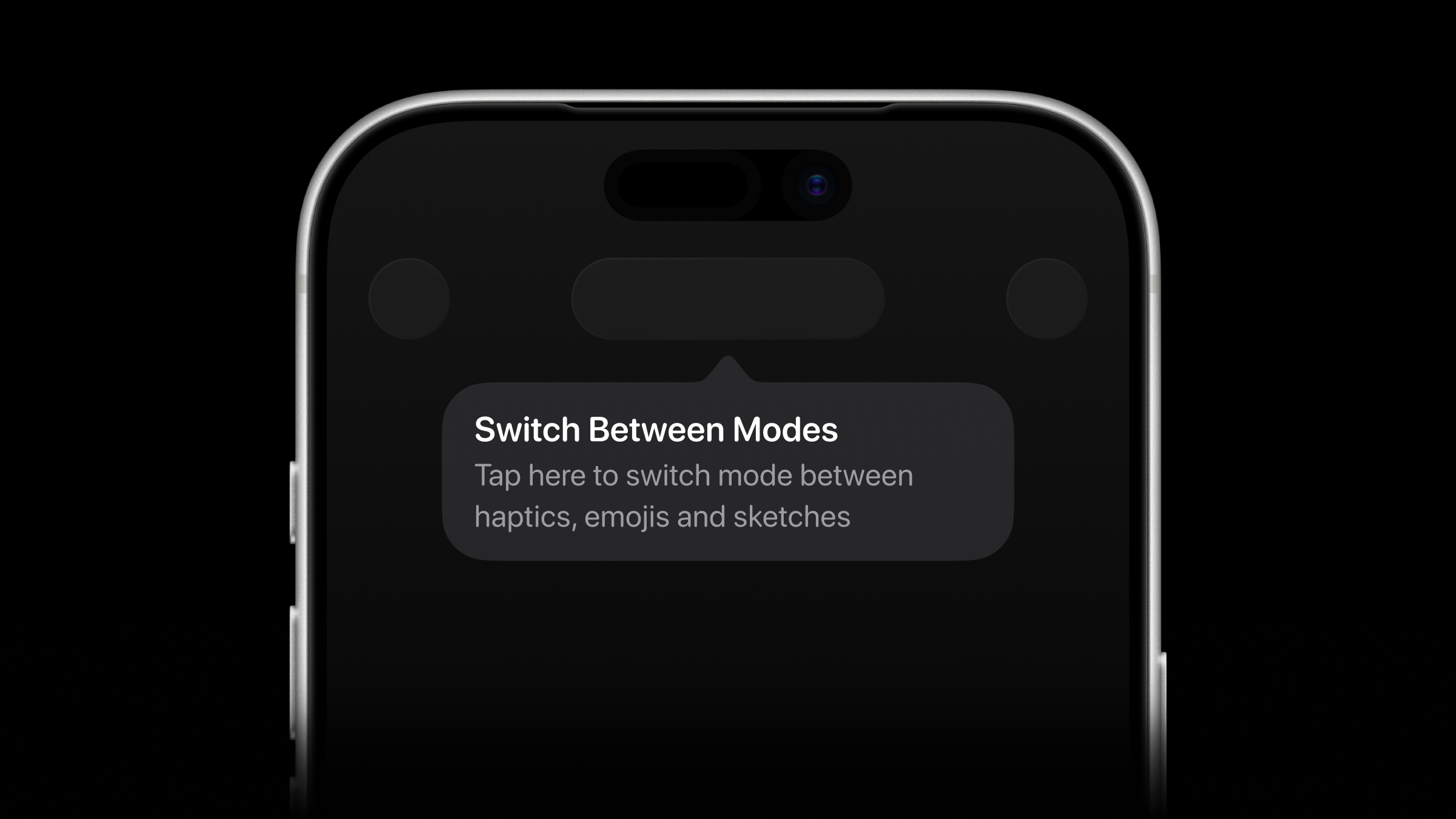
Apple's native tooltips weren't quite what we were looking for. They only work on iOS 17+ and have a somewhat angular appearance. We wanted something smoother and more polished.
Our tooltips are implemented as a UIViewController that manages presentation and dismissal via a transition delegate, handles layout, and coordinates transitions between multiple tooltips. The tooltip uses CAShapeLayer to point at elements with a custom cgPath curve. The math inside the locateTooltip() ensures that the tooltip stays within the available screen space, preventing overflow while keeping the curve pointed toward the highlighted item.
import UIKit
import PinLayout
import Combine
import UIKitExtensions
import StateMachine
import Resources

@MainActor
public final class ToastView: HighlightScaleControl {

    private static func attributedTitle(from text: String?) -> NSAttributedString? {
        guard let text else {
            return nil
        }

        let paragraphStyle = NSMutableParagraphStyle()
        paragraphStyle.minimumLineHeight = 20
        paragraphStyle.maximumLineHeight = 20
        paragraphStyle.alignment = .center

        let attributes: [NSAttributedString.Key: Any] = [
            .font: UIFont.systemFont(ofSize: 15, weight: .semibold).rounded(),
            .foregroundColor: UIColor.res.white,
            .paragraphStyle: paragraphStyle
        ]

        return NSAttributedString(string: text, attributes: attributes)
    }

    private static func attributedSubtitle(from text: String?) -> NSAttributedString? {
        guard let text else {
            return nil
        }

        let paragraphStyle = NSMutableParagraphStyle()
        paragraphStyle.minimumLineHeight = 18
        paragraphStyle.maximumLineHeight = 18
        paragraphStyle.alignment = .center

        let attributes: [NSAttributedString.Key: Any] = [
            .font: UIFont.systemFont(ofSize: 13, weight: .regular).rounded(),
            .foregroundColor: UIColor.res.secondaryLabel,
            .paragraphStyle: paragraphStyle
        ]

        return NSAttributedString(string: text, attributes: attributes)
    }

    public static func hideAllCompletedToasts() {
        ToastWindow.shared.hideAllCompletedToasts()
    }

    private static let height: CGFloat = 62

    private static let insets = UIEdgeInsets(top: 12, left: 16, bottom: 12, right: 24)

    private static let minWidth: CGFloat = 191

    private var eventsCancellable: AnyCancellable?

    private lazy var visualEffectView = UIVisualEffectView(effect: UIBlurEffect(style: .systemMaterial))

    private lazy var containerView = UIView(frame: .zero)

    private let style: ToastViewStyle

    private let removalStrategy: ToastViewRemovalStrategy

    private let eventsPublisher: AnyPublisher<ToastViewEvent, Never>

    private let eventsSubject: PassthroughSubject<ToastViewEvent, Never>

    private let labelsContainer = UIView(frame: .zero)

    private let titleLabel = UILabel(frame: .zero)

    private let subtitleLabel = UILabel(frame: .zero)

    private let iconImageView = UIImageView(frame: .zero)

    private let spinner = ActivityView(frame: .zero)

    private let stateMachine: StateMachine<ToastViewState, ToastViewEvent>

    convenience init() {
        self.init(style: .default, removalStrategy: .automatic)
    }

    @available(*, unavailable)
    public override init(frame: CGRect) {
        fatalError()
    }

    public init(style: ToastViewStyle = .default, removalStrategy: ToastViewRemovalStrategy = .automatic) {
        self.style = style
        self.removalStrategy = removalStrategy

        let eventToStateMapper: (ToastViewEvent) -> ToastViewState = { event in
            switch event {
            case .icon:
                return .icon
            case .hidden:
                return .hidden
            case .loading:
                return .loading
            }
        }

        self.stateMachine = StateMachine(initialState: .hidden,
                                         stateEventMapper: { _, event in
            return eventToStateMapper(event)
        }, sameEventResolver: { previousEvent, newEvent in
            return previousEvent != newEvent
        })

        let eventsSubject = PassthroughSubject<ToastViewEvent, Never>()
        self.eventsSubject = eventsSubject
        self.eventsPublisher = eventsSubject.eraseToAnyPublisher()

        let window = ToastWindow.shared
        super.init(frame: window.bounds)

        let backgroundView: UIView
        switch style {
        case .default:
            backgroundView = self.containerView
            self.addSubview(self.containerView)
            self.setUpContainerView()
        case .blur:
            backgroundView = self.visualEffectView.contentView
            self.addSubview(self.visualEffectView)
            self.setUpVisualEffectView()
        }

        backgroundView.addSubview(self.iconImageView)
        backgroundView.addSubview(self.spinner)
        backgroundView.addSubview(self.labelsContainer)
        self.labelsContainer.addSubview(self.titleLabel)
        self.labelsContainer.addSubview(self.subtitleLabel)

        self.setUpStateMachine()
        self.setUpIconImageView()
        self.setUpSpinner()
        self.setUpLabelsContainer()
        self.setUpTitleLabel()
        self.setUpSubtitleLabel()

        window.addSubview(self)

        switch style {
        case .default:
            self.containerView.pin
                .topCenter(-Self.height)
                .minWidth(Self.minWidth)
        case .blur:
            self.visualEffectView.pin
                .topCenter(-Self.height)
                .minWidth(Self.minWidth)
        }

    }

    required init?(coder: NSCoder) {
        fatalError("init(coder:) has not been implemented")
    }

    public override func layoutSubviews() {
        super.layoutSubviews()

        self.iconImageView.pin
            .centerStart()
            .size(34)

        self.spinner.pin
            .margin(1)
            .centerStart()
            .size(32)

        self.titleLabel.pin
            .topCenter()
            .sizeToFit()
            .minWidth(109)

        self.subtitleLabel.pin
            .below(of: self.titleLabel, aligned: .center)
            .sizeToFit()
            .minWidth(109)

        self.labelsContainer.pin
            .wrapContent()
            .after(of: self.iconImageView, aligned: .center)
            .marginStart(8)

        switch self.style {
        case .default:
            self.containerView.pin
                .wrapContent(padding: Self.insets)
                .topCenter(self.stateMachine.currentState == .hidden ? -Self.height : self.pin.safeArea.top)
                .minWidth(Self.minWidth)
        case .blur:
            self.visualEffectView.contentView.pin
                .wrapContent(padding: Self.insets)

            self.visualEffectView.pin
                .topCenter(self.stateMachine.currentState == .hidden ? -Self.height : self.pin.safeArea.top)
                .size(self.visualEffectView.contentView.bounds.size)
                .minWidth(Self.minWidth)
        }

    }

    public override func point(inside point: CGPoint, with event: UIEvent?) -> Bool {
        switch self.style {
        case .default:
            self.containerView.frame.contains(point)
        case .blur:
            self.visualEffectView.frame.contains(point)
        }
    }

    public func update(with newEvent: ToastViewEvent) {
        self.eventsSubject.send(newEvent)
    }

    public func show(error: Error, timeout: TimeInterval = 3) async {
        self.update(with: .icon(predefinedIcon: .failure,
                                title: String.res.commonError,
                                subtitle: error.localizedDescription))

        try? await Task.sleep(nanoseconds: UInt64(timeout / 1_000_000_000))

        self.update(with: .hidden)
    }

    private func setUpStateMachine() {
        self.eventsCancellable = self.eventsPublisher
            .debounce(for: .seconds(CATransaction.animationDuration()),
                      scheduler: DispatchQueue.main)
            .sink { [weak self] event in
                self?.stateMachine.send(event)
            }

        self.stateMachine.onStateTransition = { [weak self] state, event in
            guard let self else {
                return
            }

            switch (state, event) {
                // MARK: - Hidden
            case (.hidden, .icon(icon: let icon, title: let title, subtitle: let subtitle)):
                self.show() {
                    self.updateImageView(with: icon)
                    self.update(title: title)
                    self.update(subtitle: subtitle)
                    self.updateLayout(animated: false)
                }
            case (.hidden, .loading(title: let title, subtitle: let subtitle)):
                self.show() {
                    self.update(title: title)
                    self.update(subtitle: subtitle)
                    self.updateSpinner(isLoading: true)
                    self.updateLayout(animated: false)
                }
            case (.hidden, .hidden):
                return

                // MARK: - Icon
            case (.icon, .icon(icon: let icon, title: let title, subtitle: let subtitle)):
                self.updateImageView(with: icon)
                self.update(title: title)
                self.update(subtitle: subtitle)
                self.updateLayout(animated: true)
            case (.icon, .loading(title: let title, subtitle: let subtitle)):
                self.updateImageView(with: nil)
                self.update(title: title)
                self.update(subtitle: subtitle)
                self.updateSpinner(isLoading: true)
                self.updateLayout(animated: true)
            case (.icon, .hidden):
                self.hide() {
                    self.updateImageView(with: nil)
                    self.update(title: nil)
                    self.update(subtitle: nil)
                }

                // MARK: - Loading
            case (.loading, .icon(icon: let icon, title: let title, subtitle: let subtitle)):
                self.updateImageView(with: icon)
                self.update(title: title)
                self.update(subtitle: subtitle)
                self.updateSpinner(isLoading: false)
                self.updateLayout(animated: true)
            case (.loading, .loading(title: let title, subtitle: let subtitle)):
                self.update(title: title)
                self.update(subtitle: subtitle)
                self.updateLayout(animated: true)
            case (.loading, .hidden):
                self.hide() {
                    self.update(title: nil)
                    self.update(subtitle: nil)
                    self.updateSpinner(isLoading: false)
                }
            }
        }
    }

    private func setUpVisualEffectView() {
        self.visualEffectView.isUserInteractionEnabled = false
        self.visualEffectView.clipsToBounds = true
        self.visualEffectView.layer.cornerRadius = Self.height / 2
    }

    private func setUpContainerView() {
        self.containerView.isUserInteractionEnabled = false
        self.containerView.backgroundColor = UIColor.res.secondarySystemBackground
        self.containerView.clipsToBounds = true
        self.containerView.layer.cornerRadius = Self.height / 2
        self.containerView.layer.borderWidth = 1
        self.containerView.layer.borderColor = UIColor.res.tertiarySystemFill.cgColor
    }

    private func setUpIconImageView() {
        self.iconImageView.isUserInteractionEnabled = false
        self.iconImageView.contentMode = .scaleAspectFit
    }

    private func setUpSpinner() {
        self.spinner.isUserInteractionEnabled = false
        self.spinner.tintColor = UIColor.res.white
        self.spinner.lineWidth = 4
    }

    private func setUpLabelsContainer() {
        self.labelsContainer.isUserInteractionEnabled = false
    }

    private func setUpTitleLabel() {
        self.titleLabel.isUserInteractionEnabled = false
    }

    private func setUpSubtitleLabel() {
        self.subtitleLabel.isUserInteractionEnabled = false
    }

    private func show(performBeforeAnimation: @escaping () -> Void) {
        if self.window == ToastWindow.shared {
            ToastWindow.shared.presentIfNeeded(for: self)
        } else {
            ToastWindow.shared.removeIfNeeded()
        }

        self.isHidden = false

        performBeforeAnimation()

        self.layoutIfNeeded()

        UIView.animate(withDuration: CATransaction.animationDuration()) {
            if let marginTop = self.window?.safeAreaInsets.top {
                switch self.style {
                case .default:
                    self.containerView.pin
                        .topCenter(marginTop)
                case .blur:
                    self.visualEffectView.pin
                        .topCenter(marginTop)
                }
            }
        }
    }

    private func hide(performAfterAnimation: @escaping () -> Void) {
        UIView.animate(withDuration: CATransaction.animationDuration()) {
            switch self.style {
            case .default:
                self.containerView.pin
                    .topCenter(-Self.height)
            case .blur:
                self.visualEffectView.pin
                    .topCenter(-Self.height)
            }
        } completion: { _ in
            self.isHidden = true

            if self.removalStrategy == .automatic {
                self.removeFromSuperview()
            }

            ToastWindow.shared.removeIfNeeded()
            performAfterAnimation()
        }
    }

    private func updateImageView(with icon: UIImage?) {
        UIView.transition(with: self.iconImageView,
                          duration: CATransaction.animationDuration(),
                          options: .transitionCrossDissolve) {
            self.iconImageView.image = icon
        }
    }

    private func update(title: String?) {
        let newAttributedTitle = Self.attributedTitle(from: title)

        UIView.transition(with: self.titleLabel,
                          duration: CATransaction.animationDuration(),
                          options: .transitionCrossDissolve) {
            self.titleLabel.attributedText = newAttributedTitle
        }
    }

    private func update(subtitle: String?) {
        let newAttributedSubtitle = Self.attributedSubtitle(from: subtitle)

        UIView.transition(with: self.titleLabel,
                          duration: CATransaction.animationDuration(),
                          options: .transitionCrossDissolve) {
            self.subtitleLabel.attributedText = newAttributedSubtitle
        }
    }

    private func updateSpinner(isLoading: Bool) {
        if isLoading && !self.spinner.isAnimating {
            self.spinner.isAnimating = true
        }

        UIView.transition(with: self.titleLabel,
                          duration: CATransaction.animationDuration(),
                          options: .transitionCrossDissolve) {
            self.spinner.isHidden = !isLoading
        } completion: { _ in
            if !isLoading && self.spinner.isAnimating {
                self.spinner.isAnimating = false
            }
        }
    }

    private func updateLayout(animated: Bool) {
        let animator = UIViewPropertyAnimator(duration: animated ? CATransaction.animationDuration() : 0,
                                              curve: .easeInOut) {
            self.setNeedsLayout()
            self.layoutIfNeeded()
        }

        animator.startAnimation()
    }
}
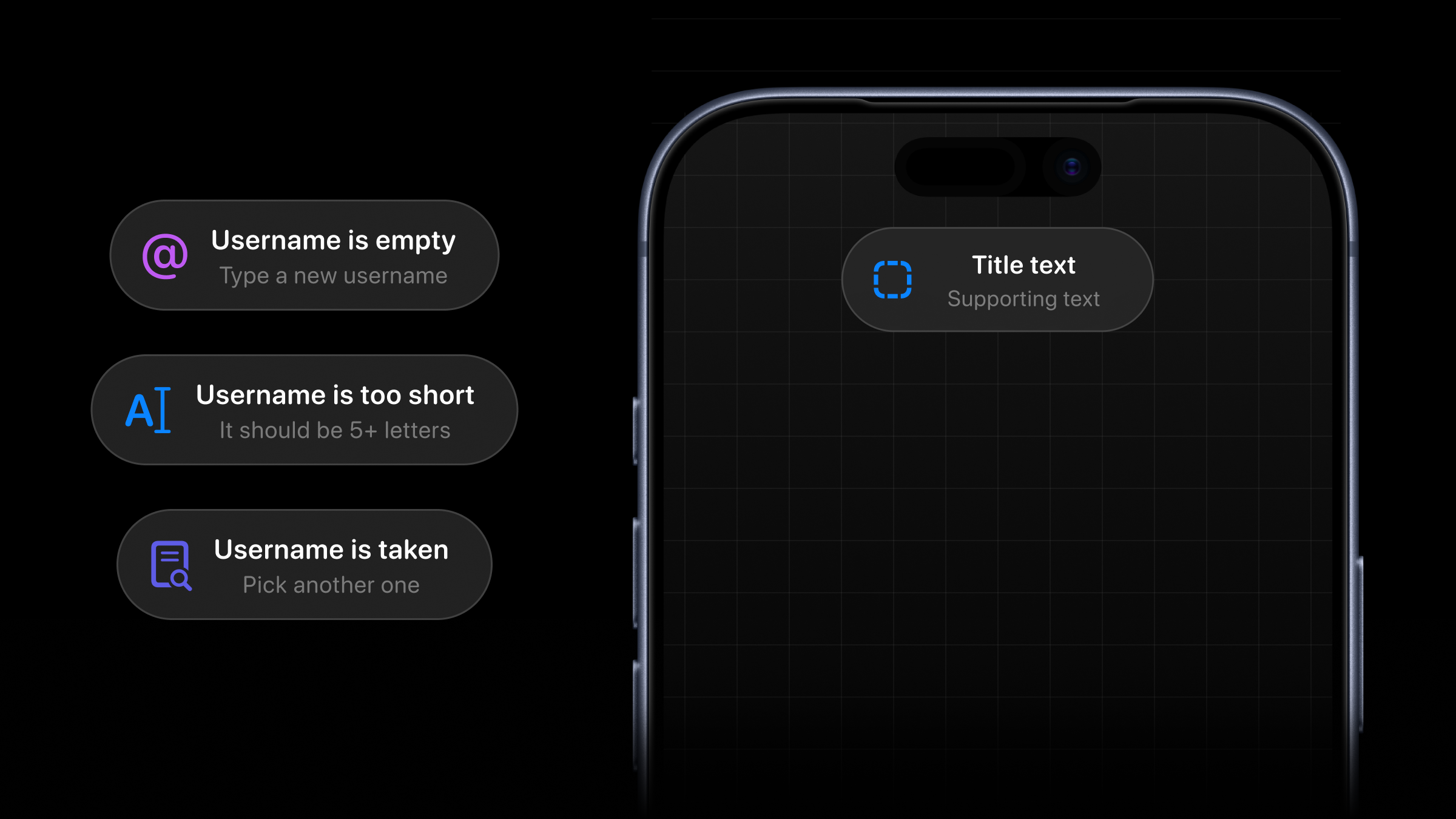
Toasts are used to inform users about action progress, including success, error, and loading states. To make state transitions deterministic and controllable, we implemented a state machine. This approach lets us separate state transitions and redraw only the components that need updating. We also added a publisher to debounce events, since too many rapid updates could overwhelm users. Additionally, we went with a custom spinner to better match our design system. It is implemented as a CAShapeLayer with an animated transform that rotates around the z-axis.
There are a few suggestions that we found important while working on this project. They're not directly related to code, but we still found them useful and would personally have been happy to hear them before starting a new project.
- Think of value first, design later. Even though design plays key role in the product development — design must be made on purpose and brings value to the user. That's the only way to win longterm. Solve existing problems.
- Use Tuist or Bazel. Don't waste your time fighting Xcode.
- Single source of truth. Our architecture provides a single place of synchronization for each domain. For example, all auth-state logic lives in
AuthSession, which distributes its state through publishers to listeners across the app and widgets. Multiple features can listen to updates from a single event emitter. - Firebase. It was a pain to work with. Analytics in particular is the worst analytics system we have ever worked with. On one of our recent projects, we used PostHog, and it was a pleasure to work with by comparison (not an ad). There are also well-known issues around Firebase rules: they are easy to misconfigure, and in the worst case you can accidentally allow read-write access. Solutions like Convex feel much more reliable, because you have to specify queries manually instead of exposing your whole database.
We're really happy you joined us on this little tour. If you have any questions, feel free to hit us up on X via @ertembiyik and @iamnalimov. Till next time, peace SIP nerds.
SIP: Huge thanks to Ertem and Ilia for putting this together. Haptics is one of the most tactile and playful iOS apps you can study and we hope that many developers benefit from the patterns and techniques here. We know we'll be stealing some code for our own apps... ✌️
This component turned out to be quite an interesting challenge. The core rule is simple: while the user is drawing, we never want to redraw the entire sketch on every pan update, because that would tank FPS very quickly. Instead, we collect points from a
UIPanGestureRecognizer, redraw only the part that actually changed, and, once the live stroke gets too large, snapshot the older part into an image and keep drawing only the fresh tail of the path.The drawing mechanism is powered by
handle(panGestureRecognizer:), which performs the following operations:drawableSketch) and calculate the exact rectangle that needs to be redrawn. This part matters because we use Bezier curves for smooth drawing, so we want to redraw only the changed area, not the whole path. Once the drawable batch gets too large, we snapshot the active sketch into aUIImageand store it inflattenedActiveSketch, while keeping only the most recent points in memory for live drawing.endDrawingphase calculates the rectangle that covers the whole sketch, moves the current stroke into a pending state if needed, clears the active arrays, and callssetNeedsDisplay()only for the affected area.The actual rendering happens in
UIView'sdraw(_:)method. First, we drawflattenedActiveSketch, then the currentdrawableSketch, and finally any pending sketches that still need to remain on screen. To push things a bit further, we also setdrawsAsynchronouslytotrue, which gives Core Animation a chance to handle the drawing work more efficiently when possible.There is one more optimization that happens right before the sketch leaves the device. In
ConversationController, we run the final[CGPoint]throughcompressed(with:)before sending it to the server. This is essentially a Douglas-Peucker-style compaction pass: we keep the endpoints, look for the point with the greatest perpendicular distance from the current segment, and split further only if that distance exceeds an epsilon threshold. In practice, this lets us preserve the overall shape of the drawing while sending far fewer points over the network.